How to use the Grilled Cheese app, screen by screen. The illustrations are generated from the app itself: the real layout and the real wording, with the colour taken out, so what you see here is what is in front of you.
Getting started

The first time you open Grilled Cheese, it asks one thing before anything else: your date of birth.
Choose your birth year, tick the box to accept the Terms of Use and Privacy Policy, and choose Continue. If you already have an account, choose Already have an account? Log in underneath instead; see Already have an account?.
Why it asks for your birth date
Everyone is asked. State and local law require us to confirm your age before you can use Grilled Cheese, and your date of birth is how we do that. You must be at least 18.
The year is usually all you need to give. Where month and day are needed as well, those fields appear. The check happens on your device, and your date of birth is never sent along with an email address.
One door, which follows availability

What comes after the age check depends on whether Grilled Cheese is open to new people right now. You will see exactly one of these doors:
- Sign-ups open
-
Create Account makes you an account on the spot. There is no email address to enter, no password to invent, and no confirmation mail to go hunting for. If someone gave you an invite code, I have an invite code lets you enter it together with an email address, so your account starts verified and the person who invited you gets the credit.
- Invite only
-
Grilled Cheese sometimes asks for an invite even while sign-ups are open. This door asks for your email address and your invite code together. Without a code it will not let you through, and it will not put you on a waiting list.
- Sign-ups paused
-
Leave your email address and choose Join the waitlist. You get a confirmation that you are on the list, and an email when a spot opens; there is nothing else to do in the meantime. An invite code skips the line: choose I have an invite code and enter it with your email. When looking around without an account is open, this door also offers Look around first, which makes you an account the same way Create Account does.

Joining the waitlist stores your email address and nothing else. It does not create an account, and asking again with the same address is harmless: the answer is the same confirmation, and you keep your place in line.
If the app cannot reach Grilled Cheese to ask which door applies, it shows the most open one and lets the server sort it out when you act. A closed gate stays closed either way; you are simply told when you try, not walled out by a hiccup.
What you get straight away
The account made by Create Account or Look around first is a real one, with an identity and a live session, and no email address attached yet. You can:
-
read the Discovery feed and anyone’s profile,
-
like posts,
-
follow people,
-
look around every part of the app.
What you cannot yet do is anything that puts you into the world: posting, replying, direct messages, and changing your profile or settings all need a verified way to reach you.
Adding an email address, when you need one
The first time you try to post, Grilled Cheese asks for an email address or a phone number, not before. The prompt is Verify your account, and it says the important part plainly: you keep this account and everything you have liked. Verifying is not starting over.
Give an email address and choose Email me a code, or a phone number and Text me a code, then enter the code that arrives. That is the whole flow, and still no password. Not now backs out and leaves you browsing.
Once verified you can post, reply, message, and edit your profile, and your follows and likes from before are all still there.
Already have an account?
Already have an account? Log in at the bottom of the first screen takes you to the sign-in form, which accepts your email address and password. If you would rather not type a password, or never set one, Sign up: email me a code sends a one-time code to an address that already exists and signs you in with that. While sign-ups are paused, a new address entered there joins the waitlist instead, with the same confirmation.

Your first identity
A Grilled Cheese account is not the same thing as a Grilled Cheese identity, and the difference matters early.
The account is you: one login, one set of security settings, one age check. An identity is a presence: a handle, a profile, followers, posts. Your account is created with one identity, and you can add more at any time, up to five in total.
When you create an identity you choose two things:
- Username
-
The name part of your handle. It has to be unique on the domain you pick.
- Domain
-
The part after the dot or the at-sign. Grilled Cheese runs across several domains and you choose which one this identity lives on. If your server offers only one, this step is skipped.
Together they make your handle, which has two forms because Grilled Cheese is reachable from two networks:
| Network | What people type to find you |
|---|---|
ActivityPub (Mastodon and friends) |
|
ATProto (Bluesky and friends) |
|
You do not have to pick one. Both work, both point at the same identity, and the app shows you which networks an account is reachable on wherever that matters.
See Identities for what identities are for and how to switch between them.
The app frame
Once you are signed in, every screen sits inside the same frame. Learning it once is most of learning the app.

The bottom bar
Four destinations, always in the same order:
- Home
-
Your feeds. This is where the app opens.
- Explore
-
Search, trends, and ways to find people.
- Alerts
-
Replies, likes, reposts, follows, and mentions. A badge on the bell shows how many you have not read.
- Profile
-
Your own identity’s profile, as other people see it.
Tapping Home when you are already on Home scrolls the timeline back to the top and refreshes it, the standard gesture and the fastest way to catch up.
The compose button
The round button in the middle of the bottom bar starts a new post. Its icon changes to match what you are looking at: a camera in photo mode, a camcorder in video mode, a pencil in text mode. See Posting for what each one opens.
The top bar
The left end is the Grilled Cheese mark; tapping it opens the menu. The right end carries the feed switcher (see Feeds) and an overflow menu.
The top bar retracts as you scroll down and comes straight back when you scroll up. One upward flick restores it, wherever you are in a long timeline. Switching tabs always brings it back, so you can never end up on a screen with no way out. The bottom bar does not hide.
The menu

Tapping the Grilled Cheese mark in the top-left opens the menu, which holds the things that are not frequent enough to earn a place in the bottom bar.
At the top is the identity you are currently posting as: avatar, full handle, and follower and following counts. Tapping it opens your profile. The double-arrow button beside it opens the identity switcher. See Identities.
Below that:
- Home
-
Back to the timeline.
- Bookmarks
-
Posts you saved. Expands to show your collections.
- Conversations
-
Private, end-to-end encrypted messages.
- Help
-
This documentation.
- Send feedback
-
Tell us something directly from the app.
On a larger screen
On a tablet, a desktop, or a phone held sideways, the frame changes shape: the bottom bar becomes a navigation rail down the left edge, and the timeline becomes a centred column with hairline borders rather than running the full width of the display.
If you would rather it did not, because a frame that reshapes itself mid-read is disruptive, turn on Settings → Appearance → Lock vertical layout. That keeps the single-column layout at any width and stops a phone from rotating at all. Full-screen photos and videos are the deliberate exception: they still rotate, because a video that has taken over the screen is the one place a sideways phone is the point.
Feeds
Home is not one timeline. It is one feed you look at through a filter, and the filter is yours to change at any moment.
Following and Discovery
Every identity has two sources of content:
- Following
-
Posts from accounts this identity follows.
- Discovery
-
Posts Grilled Cheese thinks you might want, from across the networks it federates with.
The toggle beside the face switch in the top bar decides how much of each you get:
- The globe
-
Your follows first, with Discovery mixed in. This is where everyone starts, and if you follow nobody yet it is all Discovery, so a new account is not an empty room.
- Following
-
Only the accounts this identity follows, with nothing added. When it is empty it says so, and offers a way to Explore to find people.
The choice is remembered, so Home opens the way you left it.
The four faces
The bubble switch at the right end of the top bar chooses what kind of thing the feed shows you. Every option is visible at once, with the one you are on highlighted, so you can always see where else you could go.
- Photos
-
Photo posts only, edge to edge, one square image per cell with the caption underneath. Double-tap a photo to like it; a single tap opens it full-screen. This is the default.
- Videos
-
Video posts only, playing full-bleed as you scroll. Content comes from Grilled Cheese and from the other networks it federates with.
- Text
-
Text posts only. Photos and videos are excluded. This is the Twitter-shaped face, with the byline, the body, and the action row on each cell. It is hidden unless you turn on Show the text feed under Settings, Appearance; see Appearance. Text posts always appear in Everything.
- Everything
-
No filter on the kind of post. Photos, videos and text, mixed together.
The switch only appears on Home. On Explore, Alerts, and Profile it would be steering a screen you are not looking at, so it is hidden there.
The compose button changes with the face you are on: a camera in Photos, a camcorder in Videos, a pencil in Text and Everything. Whatever you are looking at, the button makes more of it.
Reading a post
A text cell shows the author’s display name, their handle, and when it was posted, then the body, then a row of actions:
| Action | What it does |
|---|---|
Reply |
Opens the thread with the reply box focused. |
Repost |
Opens a chooser with three ways to reshare it. See Resharing a post. |
Like |
Tells the author, and feeds Discovery. |
Share |
Hands the post to your device’s share sheet, or copies a link. |
More (…) |
Bookmark, mute the author, block them, report the post, copy a link, translate, and, if it is yours, edit or delete. |
Tapping anywhere else on the cell opens the thread.
Resharing a post

The repost button does not repost on the spot. It opens a chooser with three ways to pass a post on, because they say quite different things.
- Repost
-
Sends the post to your followers as it is, with your name on the delivery rather than the content. Nothing is added. Once you have reposted, the same button reads Undo repost, and the repost count on the post drops back when you use it.
- Quote post
-
Opens the composer with the original attached underneath, so your post is the thing people read and theirs is the thing you are pointing at. Use it when you have something to add. A quote is an ordinary post otherwise: it can carry photos, a poll, a content warning, and its own audience setting.
- Markup
-
Highlights part of the post and shares that as an image. Use it when the point is a specific sentence rather than the whole thing.
Marking up a post

Markup opens the post on its own screen, rendered the way it looked where you found it.
Drag across the text to highlight it. Tap a highlight again to remove it. The row of swatches along the bottom chooses the highlighter colour, and the arrow in the app bar undoes the last one.
The swatch colours come from the app theme, so they change when it does.
The download button to the left of the swatches saves the marked-up image straight to your photos without posting it. Use it when the picture is the only thing you wanted. Grilled Cheese confirms the save, and says so plainly if it could not write to your photo library.
Next turns the marked-up card into an image and hands it to the composer, attached the way a photo you picked would be. Write whatever you want around it and post it normally. Two things happen for you: the alt text is prefilled with the post’s text, so the image is still readable to anyone using a screen reader and still turns up in search, and the image is saved to your camera roll if you have asked for that under Settings.
Refreshing
Pull down from the top of the timeline to refresh. Tapping Home in the bottom bar while already on Home does the same and returns you to the top.
Offline
Grilled Cheese keeps the last feed it loaded. Open the app with no connection and you get that cached timeline with a banner saying so, rather than an error page. Anything you post while offline waits in an outbox and goes out when the connection comes back.
Posting
The compose button in the middle of the bottom bar opens whichever composer matches the face you are on.
Text posts

The pencil opens a rich-text composer. Beyond plain text you can:
-
Attach up to ten photos, or one video.
-
Add a poll.
-
Attach your location, or a place.
-
Choose who can see it, and who can reply.
-
Declare the language it is written in, so it reaches the right readers.
-
Schedule it for later rather than posting now.
A post can carry a content warning: it shows its label and stays covered until a reader chooses to open it. See Content warnings.
Photo posts
The camera opens a camera-first flow with four steps:
-
Pick up to ten photos, or take one.
-
Crop. One aspect ratio governs the whole set: square by default, or portrait (4:5) or landscape (1.91:1). Framing within that ratio is per-photo. What you frame is what gets uploaded, not a crop applied on display.
-
Filter. Colour presets, applied per photo.
-
Caption, alt text, and visibility, then share.
For a photo that is not square you also choose how it sits in the square feed cell: Crop centres and fills it, Fit shows the whole frame letterboxed. Opening the photo full-screen always shows the whole frame either way.
What happens to a photo when it uploads
Every photo you post is prepared on your device before it is sent, whichever composer it came from.
-
A large photo is scaled so its longest side is 2000 pixels, and saved in a compact format: WebP on iPhone, iPad and Android, and JPEG (or PNG, for a picture with transparency) elsewhere.
-
A photo that is already small enough is sent in its own format, without being compressed a second time.
-
The hidden details a camera writes into the file are removed, on your device, before it leaves. That includes the place it was taken, unless you have turned on Keep location data on photos under Settings → Privacy. Camera and lens details are kept either way.
Video is sent as it is.
Alt text
Alt text is the description of a photo that a screen reader reads aloud in place of the image. It is worth the ten seconds.
Every photo you attach carries an Alt button in its corner, in both the text composer and the photo composer. Tap it to open the description editor. The photo sits at the top and the whole page scrolls, so it moves out of the way as you write and comes back when you scroll up. There is room for a few sentences, and a counter holds you to 1500 characters, the length that travels intact to other servers. Descriptions are plain text, because plain text is how they are read out.
With several photos attached, each one gets its own description. The arrows at the bottom of the editor move between them and nothing you have typed on the way is lost. Saving writes them all at once, and leaving without saving keeps every photo as it was.
While a photo has no description, a reminder sits under the attachments. It is a suggestion and never blocks a post. If you would rather not see it, turn Alt text reminder off under Settings, Accessibility.
Video posts
The camcorder opens Grilled Cheese’s capture flow, and it is deliberately unlike a normal video recorder: square only, ten seconds maximum, and recording runs only while your thumb is on the button.
Press and hold to record. Lift to pause. Move the camera, press again. Each press is a segment and the segments run together, so a cut happens the instant you lift your thumb. The whole edit is made while shooting, and there is nothing to assemble afterwards. The bar across the top of the viewfinder shows the segments you have and how much of the ten seconds is left.
If you would rather post video you already have, the text composer takes an attachment from your library.
Posting a thread

A thread is several posts written in one sitting and published in order as one chain. You build it in the ordinary composer, one message at a time.
-
Write the first message as you normally would.
-
Choose Add to thread, below the editor. The message you just wrote moves up into a numbered row, the editor clears, and the button in the top right changes from Post to Post 1, counting what is queued.
-
Write the next message and choose Add to thread again. Repeat for as many as you want.
-
When the last message is in the editor, choose Post. Everything publishes in order, as a chain.
Each queued message keeps a position chip, 1/2 and so on, so you can see the
running order. To drop one, use the X beside it; remove the last queued
message and the composer returns to writing a single post.
What rides per message, and what does not
Photos, content warnings, and a location belong to the message you attach them to, so different parts of a thread can carry different images. See Content warnings.
Audience is set once for the whole thread. One thread, one audience, so changing the visibility control changes it for every message.
A few things a thread cannot carry, and the composer says so when you try:
| Not allowed in a thread | Why |
|---|---|
Polls |
A poll belongs to one post, not a chain. |
Video |
Not supported in a thread yet. |
Scheduling |
Threads post immediately. |
Posting offline |
A thread needs a connection, because the chain has to be built in order server-side. A single post queues in the outbox instead. |
There is also a cap on how many messages one thread can hold; the composer tells you the number if you reach it.
Scheduling
Any post can be scheduled instead of published. Scheduled posts collect under Settings → Scheduled posts, where you can edit the time, post one immediately, or delete it before it goes.
Content warnings
A content warning is a label the author puts on a post. It says what is behind it, and the post stays covered until a reader chooses to open it. Nothing is deleted and nobody is blocked from reading: it is a curtain, not a lock.
Adding one to a post
Mark as sensitive in the composer opens two controls, and they do different jobs.
- Content warning
-
A short line saying what is in the post, shown in place of the post while it is covered. "Spoilers for last night’s episode" is a content warning. So is "hospital photo".
- The type
-
Nudity, Sexual content, Violence, or Other. This is the part that travels. It is what other networks are told and what a reader’s own settings match on, so pick the closest one.
Warning text on its own is enough. A post with warning text is marked sensitive whether or not you also chose a type, which is how a content warning behaves on Mastodon, and it saves you setting two controls to mean one thing.
A warning is set when you post. Editing a post does not yet add or remove one.
In a thread the warning belongs to the message you attached it to rather than to the whole chain, so one message can be covered and the rest left open; see Posting a thread. A reply carries one exactly like a top-level post, and so does a quote post.
What a reader sees
A covered post shows the author, the warning text, the label, and Tap to view. The label names the type: Sensitive: nudity, Sensitive: sexual content, Sensitive: violence, or plain Sensitive content when there is no type. Photos and video sit behind a blur rather than collapsing. Revealing one post reveals that post and nothing else, so the next one is still covered.
How much sensitive content reaches you at all is yours to set. Under Settings > Content preferences, Sensitive content offers Less, Standard, and More. It governs people you do not follow: a sensitive post from a profile you follow arrives in your feed like any other post. See Content preferences.
A warning is not a hidden word
The two are easy to confuse, and they work in opposite directions.
| A content warning | A hidden word |
|---|---|
Set by the author, on their own post. |
Set by you, on your own reading. |
Everyone sees it, on every network the post reaches. |
Nobody else knows it exists, not even the author. |
Covers the post and offers to open it. |
Takes the post out of your feeds and replies entirely. |
Use a warning when you want other people to choose. Use a hidden word when you never want to see the thing again. Hidden words live under Content preferences with everything else that is yours alone.
The AI-generated label
AI-generated is a label too, and it behaves the opposite way from a warning. It is always visible and it covers nothing, because the entire point of a disclosure is that people see it.
It is the author’s to set. Grilled Cheese staff can neither add one to your post nor take yours away, because whether you used a machine to write something is a statement about your own work rather than a judgment anyone else gets to make for you.
Warnings from other networks
Much of what you read comes from Bluesky and from the fediverse, and both carry labels of their own. Grilled Cheese honours them rather than deciding again.
-
A Mastodon content warning arrives as a warning here, with the author’s own text in place of the post. Mastodon warnings carry no type, so those posts are labelled plain Sensitive content.
-
A Bluesky self-label maps onto the four types:
nuditybecomes nudity,pornandsexualbecome sexual content,graphic-mediaandgorebecome violence. -
Bluesky moderation services label other people’s posts, not only their own. Those verdicts are honoured as well, so a post its author never flagged can still arrive covered.
-
A label Grilled Cheese does not recognise is ignored rather than guessed at. An unknown label never covers a post by itself.
The source network stays in charge of its own labels. If the author or the moderation service removes a warning there, it clears here the next time we see the post.
For what happens in the other direction, when a warning you wrote travels outward, see Content warnings across the networks.
Adult content
Grilled Cheese does not carry adult content today. Plainly, and without qualification, because people plan around this:
-
Posting it here breaks the rules. A first time gets you a notice explaining the rule rather than a penalty; repeating it costs you standing. See Reporting and moderation.
-
Posts from Bluesky and from the fediverse labelled nudity or sexual content are not shown in Grilled Cheese at all. Not blurred, not one tap away: excluded, for every reader, on every screen. That holds whether the author labelled the post themselves or a moderation service labelled it for them.
-
Violence is not part of this. A post labelled violence is shown behind its warning, like any other covered post.
This is a stage rather than a settled position. It holds until age verification ships. After that, adult content becomes a label instead of a removal: shown only to readers who have verified they are over 18 and who have turned it on, and off by default for everyone else. App store rules mean that switch will live on the Grilled Cheese website rather than inside the app.
Reporting something that should have been labelled
Every post has Report in its overflow menu, and unlabelled adult content is one of the reasons you can choose. Use it. An unlabelled post is exactly the case a reader can see and a server cannot.
On a Grilled Cheese post, a moderator can add or clear the sensitive flag. That is the whole of what they can change. Your words, your warning text, and your AI-generated label are never rewritten by staff; a post that breaks the rules is taken down rather than quietly edited.
On a post from another network, the labels belong to that network. Moderators here can hide it from Grilled Cheese and no more than that, because the copy living on the source server is not ours to relabel.
Settings > My reports shows what you sent and what came of it; see Reporting and moderation.
Threads and replies

Tapping a post opens it as a thread: the post at the top, its replies below, and a reply box pinned to the bottom of the screen.
Tapping Post your reply expands the box into the full composer, so a reply can carry photos, a poll, or a content warning exactly like a top-level post. Reply counts on the original update as soon as yours lands.
If nobody has replied yet, the thread says so rather than showing an empty space.
Who can reply
The author decides. When composing, who can reply offers everyone, only people you follow, or only people you mention. A reader who is outside that set sees the thread but not the reply box, with a line explaining why.
Threads you write yourself
A thread is several of your own posts published in order as one chain. You build one in the composer with Add to thread rather than by replying to yourself after the fact. See Posting a thread.
Bookmarks
More (…) → Bookmark saves a post to read later. Bookmarks live in the menu, and you can sort them into collections rather than leaving them in one pile.
Profiles

The Profile tab shows your current identity exactly as everyone else sees it. This is the point of putting it in the bottom bar rather than behind a settings menu.
The header carries the avatar, the display name, the full handle, and the follower and following counts. Underneath, three tabs divide the identity’s output:
- Posts
-
Top-level posts, newest first.
- With replies
-
The same, plus everything this identity has said in someone else’s thread.
- Media
-
Photos and videos only, as a grid.
The network badge
Under the Edit profile button sits a small badge naming the networks this identity is reachable on: ATProto + ActivityPub for a Grilled Cheese identity. On someone else’s profile it tells you where they actually live, which is what decides whether a given interaction will reach them.
Editing your profile
Edit profile changes the display name, the bio, the avatar, the banner, and the links shown on the profile. Avatars and banners get a crop step so you control the framing rather than accepting a centre crop.
Changing your username is separate, under Settings → Account, because it changes your handle, the address other people use to find you.
Somebody else’s profile
The same layout, with Follow in place of Edit profile. The overflow menu holds Add to List, mute, block, and report.
- Mute
-
You stop seeing them. They are not told, and nothing changes for them.
- Block
-
You stop seeing each other. Blocking removes them from your feeds immediately.
- Report
-
Sends the account or a specific post to moderation. See Settings for where to follow up on what you have reported.
If an account is private, its header still shows name, avatar, counts, but its posts are replaced by a line saying the account is private, and Follow becomes a request the owner has to approve.
Sharing who you are
The QR button in the profile app bar shows a code for this identity that another phone can scan to land straight on your profile. The scanner is on Explore.
Lists
A list is a group of accounts you put together yourself. A list of the reporters covering your town, a list of the people you met at a conference, a list of everyone in a band. Lists are reached from Lists in the menu.
Two things are worth knowing before you make one.
- Members can be from any network.
-
A list is not limited to accounts on Grilled Cheese. You can put a Bluesky account, a Mastodon account, and a Grilled Cheese account in the same list, because a list holds people rather than posts.
- Nobody is told they are in your list.
-
Adding somebody sends them no notification and changes nothing about what they see. A list is a note you keep about who is who.
Making a list
Lists in the menu shows the lists you have made, newest first. The + button makes a new one. A list has a name and, if you want one, a description saying what it collects.
The overflow menu on a row edits that name and description, or deletes the list. Deleting a list deletes only the list: the accounts that were in it are untouched, and you stay following whoever you were following.
Adding and removing people
Open a list to see who is in it. The add person button at the top asks for a handle or an address, and takes any of the forms an account can be addressed by:
-
a handle on this server, like
sample.dissipate.test -
a Bluesky handle, like
name.bsky.social -
a fediverse address, like
@user@host
This is deliberately typed rather than picked from a menu of people you follow. You do not have to follow somebody to keep them in a list, and the account you want may be somewhere you have never visited. If the address does not resolve to a real account, the app says so and leaves what you typed in the box to fix.
Each row in a list has a remove button. Removing somebody from a list does not unfollow them.
Adding somebody from their profile
The quicker route, and the one most people use: open the account’s profile, tap the overflow menu, and choose Add to List.
The sheet lists every list of yours with a tick against the ones that already hold this account, so you can see at a glance where they are filed. Ticking a list adds them, unticking removes them. New list at the top makes a list and puts them in it in one go, which is how most first lists get made.
Add to List and Add to Starter Pack are separate entries in that menu, and they do different jobs. A list is a private grouping you keep for yourself. A starter pack is something you hand to other people.
Following everyone in a list
A list you have opened has Follow everyone along the bottom. It follows every account in the list in one action.
It asks before it does it, and tells you how many accounts that is, because it is a lot of following at once and there is no single undo for it. Anyone you already follow is left alone, and so is anyone you have blocked. When it finishes, it reports how many people it newly followed, how many you were already following, and how many it skipped.
What a list is not
A list is not a feed. There is no timeline of posts from the accounts in a list, and the app does not offer one, because there is nothing behind it yet. What a list gives you today is the grouping itself, the ability to add anyone from anywhere, and the ability to follow the whole group at once.
Muting or filtering by list is also not available. A list has no effect on what you see; it only records who is in it.
Curated lists on Explore are the same kind of object, assembled by Grilled Cheese rather than by you. You can follow everyone in one of those the same way, but you cannot edit it, because it is not yours.
Identities

This is the part of Grilled Cheese that works differently from everywhere else, so it is worth reading even if you skip the rest.
Your account is you: one email address, one password, one set of security settings. Your identities are the presences you keep, each with its own handle, profile, followers, posts, and preferences. An account can have five.
They are not sub-accounts and not aliases. To everyone else, two of your identities look like two unrelated people. Nothing on a public profile connects them, and the app never posts as one while you think you are the other.
Switching
The double-arrow button beside your handle in the menu opens the switcher. Choose an identity and the whole app reloads as that persona: its feed, its notifications, its settings, its drafts.
The identity you are currently acting as is shown in the menu at all times, because posting as the wrong one is the mistake this design has to prevent.
Creating one
New identity in the switcher asks for two things: a username, and the domain it lives on. Grilled Cheese serves several domains, and the identity’s handle is the two together. On a server with only one domain, the choice does not appear.
Pick carefully. The handle is the address people use to find you. It can be changed later, under Settings → Account, but anyone holding the old one will have to be told.
What is shared and what is not
| Belongs to the account | Belongs to each identity |
|---|---|
|
|
The split is what lets one identity be private while another is public, and what makes a change to your password protect all of them at once.
Organizations
An organization can point a domain it owns at Grilled Cheese. Once the domain is
validated, the organization can grant identities on it, [email protected],
to member accounts. Those work exactly like any other identity: the member
switches to it, posts from it, and keeps it separate from their personal
presences.
Federation
Most social apps are one network. Grilled Cheese is on two at once.
It speaks ATProto, the protocol Bluesky runs on, and ActivityPub, the protocol Mastodon and the rest of the fediverse run on. You post once and both networks get it. You follow one account and it does not matter which network that account lives on. Nobody has to sign up here to read you, and you do not have to leave to read them.
That is the good part. The rest of this section is the honest part: the two networks are not the same shape, so a post does not always arrive looking the way you wrote it. It is worth ten minutes now rather than a surprise later.
The About page has the short version of what federation is. This is what actually happens.
Your two addresses
One identity, two ways to be reached, and both are real:
| Network | What people type to find you |
|---|---|
ATProto (Bluesky and friends) |
|
ActivityPub (Mastodon and friends) |
This is deliberate rather than a quirk. The two networks were designed with different addressing, and there is no single string that works on both. The app shows you the right form wherever it matters, and the badge under your profile name says which networks an identity is reachable on; see Profiles.
If you own a domain, it can be your handle on ATProto, and it behaves differently on the two networks in a way that surprises people. See Using your own domain as your handle.
Following people on other networks
Search for them and follow them. That is the whole of it.
Explore’s People tab searches accounts on the other networks as well as this
one, so a Bluesky handle like name.bsky.social or a fediverse address like
@user@host finds the person; see Explore. Following works the
same way whichever you typed, their posts land in Following alongside everyone
else, and one list can hold accounts from all three networks at once; see
Lists.
Follows travel in both directions. Someone on Mastodon can follow you without an account here, and their follow arrives in your notifications like any other. On a private identity it arrives as a request you approve; see Private accounts and the other networks.
Where the posts in your feeds come from
Following is straightforward: it is the accounts you followed, wherever they live.
Discovery and the Everything face are wider than that. Grilled Cheese reads a live stream of public posts from the Bluesky network, the firehose, and indexes what comes past. Fediverse posts arrive a different way, because ActivityPub has no firehose: they are delivered to us because somebody here follows the author, or pulled in when somebody here opens their profile. Everything sits in one pool, and the Everything face is that pool in time order with nothing filtered out by kind. See Feeds.
Two things shape what reaches the pool at all:
-
Only public posts are indexed. A followers-only post from another server is never stored here.
-
Posts labelled nudity or sexual content are excluded outright, for every reader, on every screen. See Adult content.
Languages
The Bluesky firehose used to be filtered on the way in, and only English and Spanish posts were kept. That limit is gone: the pool now stores every language, so what you see is no longer narrowed by a decision made here.
Three separate settings get confused with each other:
- The app’s language
-
Settings > Language, set per identity. Each identity keeps its own, so switching identity switches the interface with it. It changes the buttons and labels. It does not filter your feeds.
- The language of a post you write
-
Set per post, in the composer. It travels to both networks, where it drives other people’s translate buttons and their language filters.
- The language of a post you read
-
Comes from its author. It is what the translate option in the overflow menu works from.
If you do not declare a language, Grilled Cheese uses your device’s language for a post that has text in it, and sends nothing at all for a post that is only media. It never guesses from the words themselves. A guess would travel outward as a claim you never made, and a wrong claim is worse than silence.
Replies, likes and reposts across networks
Replying to a Bluesky post or a Mastodon post works the same way as replying to anything else, and your reply is delivered to the author’s server. Likes and follows cross too.
Threading is where it frays. A conversation stays properly threaded within one network, but a reply whose parent came from the other network can lose its place in the chain. If a thread looks like it has holes in it, that is usually what happened rather than something you did.
Reposts and reactions do not survive the crossing intact, and the table below says how.
Content warnings across the networks
A warning you put on a post travels, but the two networks carry different parts of it. See Content warnings for what a warning is and how to add one.
The type is carried as a self-label, so the post arrives covered and Bluesky’s
own settings apply to it. The warning text you wrote is not carried. Bluesky
has nowhere to put it. Readers there see that the post is labelled, not what
you said about it. Other and untyped warnings go out as graphic-media,
which is the label that covers a post without asserting anything about what is
in it.
Both parts are carried, in exactly the shape Mastodon uses: the post is marked sensitive and your warning text becomes the summary shown in its place. This is the network where a warning arrives whole.
|
Important
|
Warnings work per post on both networks. Warnings that apply to a whole identity are a different matter: ATProto has account-level labels, and ActivityPub has no equivalent at all. So a label on your identity cannot behave the same way everywhere. Here and on Bluesky your profile can be gated behind it. On Mastodon and the wider fediverse your posts still carry their labels, but your avatar, banner, and bio are published in the open, because there is no protocol slot to gate them with. The gap is in the protocols, not in a setting. Nothing Grilled Cheese can turn on closes it. |
What crosses, and what it looks like when it arrives
Only public posts federate. A post limited to your followers or to people you mention stays here, unless your whole identity is private, which changes things again; see Private accounts and the other networks.
Everything below is about a public post.
| On Bluesky | On Mastodon | |
|---|---|---|
Alt text |
Carried. |
Carried, as the attachment’s description. |
Video |
Only video you attached as a file. Video hosted for streaming does not federate anywhere. |
The same, plus a still image so a thumbnail appears. |
Video captions |
Carried. |
Not carried at all. |
Polls |
There is no poll type. It goes out as a link back to the post here, and Bluesky readers cannot vote. |
A real poll. It renders and they can vote, and the tallies come back within a few minutes. |
Quote posts |
Only when you quote a Bluesky post. Quoting a Grilled Cheese post shows no card. |
Only when you quote a fediverse post. Quoting a Grilled Cheese post shows no card. |
Reposts |
No repost record is written, so your repost is invisible there. |
Delivered as a boost, normally. |
Likes and reactions |
A plain like. The emoji is not carried, and only your first one counts. |
A plain favourite. No emoji. |
Editing a post |
The record is updated in place. |
An edit is sent, and Mastodon shows the edited marker and the history. |
Deleting a post |
The record is deleted. |
A delete is sent, and the old link reports that the post is gone. |
Threading |
Threaded, unless the post you replied to came from the fediverse. |
Threaded, unless the post you replied to came from Bluesky. |
Melts |
Published to your identity’s ATProto repository as a Grilled Cheese record, and deleted when the Melt melts. The Bluesky app does not show it. |
Sent as an ordinary public post carrying the picture, and deleted when the Melt melts. |
Long-form posts |
The title, an excerpt, and a link back, cut hard at 300 characters. |
A full article with its title and summary, linking back here. |
Formatting |
Plain text only. Bold, italics, headings, lists, and colour are lost. |
Most formatting survives. |
Hashtags |
Clickable, and they reach Bluesky’s tag feeds. |
Plain text. Not clickable, and not in Mastodon’s hashtag timelines. |
Profile bio |
Cut at 256 characters. |
Carried in full. |
Profile links |
There is no link list to carry them. They are appended as plain lines, and dropped if they do not fit. |
A proper link table. |
Avatar and banner |
PNG and JPEG only, up to 1 MB. Anything else is skipped. |
Any format, any size. |
Pronouns and birthday |
Not sent. |
Not sent. |
Verified claims |
Not sent. |
Not sent. |
The language of a post |
Carried. |
Carried. |
What never leaves Grilled Cheese
Some things are deliberately not on either protocol, and it is worth saying so because people assume otherwise.
- Conversations
-
Private messages here, ordinary or secure, do not federate. Bluesky has no direct messages of the kind we would send, so there are none there at all. See Conversations.
- Blocks and mutes
-
No block or mute record is sent to either network. They are enforced here, on what reaches you.
- Verified claims
-
A verified claim on your identity means something because of how it was checked here. It is not sent outward, because nothing out there could check it.
|
Warning
|
There is one exception, and it matters. Somebody on Mastodon can send you a direct message, and it arrives as a conversation here. That conversation is not encrypted. ActivityPub has no message encryption at all, so its contents are readable by us and by whoever runs the sender’s server. It is treated like any other ordinary conversation: it carries no warning, and never the lock that marks a secure one. Attachments on an incoming fediverse message are dropped, so a message that was only a picture arrives empty. |
Turning a network off
Settings > Sharing across networks has one switch per network, both on by default. An identity can federate to both, to one, or to neither; see Settings.
Turning one off stops new posts and reposts going out to that network. What is already out there stays out there, and an edit you make afterwards is not sent, so remote copies of old posts go stale where they are.
Two things still happen with a switch off, on purpose:
-
Deleting a post still withdraws it from the other network.
-
Changing a post’s audience so that it is no longer public still withdraws it.
The switch stops new sharing. It never stops a retraction, because a retraction is the thing you would most want to work.
It also does not take you off the network. Your profile is still served, people can still follow you, and follows, likes, and profile changes are unaffected. It governs the posts you share, not whether you exist.
A few things that surprise people
-
You have two addresses on purpose. A post can read
@alice.comin its own text while the fediverse address for the same person is@[email protected]. -
Reposting is invisible on Bluesky. Your followers there will not see that you passed something on.
-
An emoji reaction becomes a plain like on both networks, and only your first one counts.
-
Hashtags work on Bluesky and are dead text on Mastodon. Same post, same tag, two outcomes.
-
Quoting a fellow Grilled Cheese user shows no quote card anywhere. Readers on both networks see a bare post with no sign of what it was pointing at.
-
Bluesky readers cannot vote in your poll. They get a link back here.
-
Locking your identity removes your Bluesky history. Not just future posts; see Private accounts and the other networks.
-
Messages are not part of any of this. Nothing you say in Conversations goes anywhere near either protocol.
Using your own domain as your handle
An identity’s handle normally comes from Grilled Cheese: a username you pick, plus
one of the domains this server runs, so you.grilledcheese.app. If you own a
domain, you can use that instead and be alice.com, or a subdomain of it,
at.alice.co.uk.
This is not a badge and not a paid extra. It is how handles work on the wider
ATProto network: the domain is the name, and the only thing Grilled Cheese does is
check that the domain agrees with you about who it belongs to. Because the
domain is yours, the handle is yours too. It comes with you if you ever move
your identity to another provider, which a grilledcheese.app handle cannot.
What changes, and what does not
Your handle is an address, not an account. Changing it changes what people type to find you, and nothing else:
- Posts, followers, likes, lists
-
Untouched. Nobody has to follow you again.
- Your DID
-
Untouched. That is the permanent name underneath the handle (see Moving your account), and it is what makes the change safe.
- Your username
-
Still there, still yours, and still reserved on the Grilled Cheese domain you signed up on. Giving the domain back returns you to it.
- Your fediverse address
-
Does not change. You stay
@[email protected]to Mastodon and other ActivityPub servers whatever your ATProto handle is.
That last one surprises people, so the Handle screen says it too. A fediverse
address is served by the domain in it, so @[email protected] would mean your
own site answering fediverse lookups for you, which is a much larger promise
than publishing one record. The two networks simply address you differently,
the way they already do today.
|
Warning
|
Anyone holding your old handle has to be told the new one. Old links and old mentions do not follow you. |
Before you start
-
A domain, or a subdomain, that you control. You need to be able to sign in wherever its DNS is managed, which is usually the registrar you bought it from, or whoever hosts your site.
-
One of two things you can publish there: a DNS record, or a small file served over HTTPS. Either is enough on its own, so pick whichever is easier where your domain lives.
-
An identity that is already set up on the ATProto network. A brand new identity takes a few minutes to get there. Until it has, the Handle screen says so rather than showing you records that are not final.
You do not need a website. A domain parked at a registrar with nothing behind it works fine, using the DNS option.
Where it lives
Settings → Handle shows the handle you are using now, the username it is built from, and a Use my own domain section underneath. Type your domain in the field there and the two records you can publish appear below it, filled in with your own identity’s details and each with a copy button.
There is no wizard, on purpose. Publishing a record takes two minutes and then you wait for the internet to catch up, and a "next" button would misrepresent the waiting. Both options are on screen at once, and you press Verify and use this handle when you are ready.
Option 1: a DNS TXT record
The record the app shows you looks like this, with your own domain and your own identity in it:
Record type |
|
Record name |
|
Record value |
|
Two things about that name catch nearly everybody:
-
The leading underscore is part of it.
_atproto, notatproto. -
Most DNS forms ask for the name relative to your domain and add the rest themselves. In that case the value to type is
_atproto, not_atproto.alice.com. A form that shows you the full name after you save is telling you which kind it is: if it now reads_atproto.alice.com.alice.com, take the domain part back out.
For a subdomain handle the same rule applies one level down. A handle of
at.alice.co.uk wants a record at _atproto.at.alice.co.uk, which in a
relative form is _atproto.at.
In general terms, at the three places people most often have a domain:
- Cloudflare
-
Websites → your domain → DNS → Records → Add record. Type
TXT, Name_atproto, Content the whole value including thedid=in front. Leave Proxy status alone; TXT records are not proxied. - Namecheap
-
Domain List → Manage → Advanced DNS → Add New Record. Type
TXT Record, Host_atproto, Value the whole value including thedid=, TTL Automatic. - GoDaddy
-
My Products → your domain → DNS → Add. Type
TXT, Name_atproto, Value the whole value including thedid=.
If there is already an _atproto record on the domain, left over from another
provider, edit it rather than adding a second one beside it. Two records at
the same name are not merged, and the older one can be the one that answers.
Paste the value exactly as the app gives it, including the did= at the front.
Some forms wrap the value in quotes for you when they save it, which is normal
and does not break anything. Adding the quotes yourself on a form that also
adds them is what breaks it.
Option 2: a file on your site
If you already run a website on the domain, serving one small file is often quicker than waiting for DNS:
Address |
|
Contents |
|
The whole body of that response has to be the identifier and nothing else: no HTML around it, no page template, no trailing anything. It also has to be served over HTTPS by the exact domain you are claiming.
|
Important
|
The check does not follow redirects. If https://alice.com/
redirects to https://www.alice.com/, which is a very common default, then a
file placed on the www site is not reachable at the address being checked and
verification fails. Either serve the file on the bare domain without a
redirect, or claim www.alice.com as the handle, or use the DNS option, which
is unaffected by any of this.
|
Note also that the identifier in this file has no did= in front of it. That
prefix belongs to the DNS record only. The app shows each one in its correct
form, so copying rather than retyping avoids the whole question.
Verifying
Press Verify and use this handle. Grilled Cheese looks for both proofs and one passing is enough, so there is no need to publish both.
When it passes, the handle changes immediately and everywhere: the app, your profile, and the announcement Grilled Cheese sends out to the rest of the network so other servers learn your new name. The Handle screen then reads Verified and in use, with the domain you claimed and when it was last checked.
How long it takes
The file option is usually instant. Publish it, press the button, done.
DNS is slower, and how much slower is not up to us or to you. A new record normally shows up within a few minutes, but it can take up to 48 hours to reach everywhere, and old records linger for as long as their TTL says they should. A failed verification a minute after you saved the record is the expected case, not a mistake you made. Wait, then press the button again.
If you want to watch it yourself, the usual command line tools work. On macOS or Linux:
dig +short TXT _atproto.alice.com
curl -sS https://alice.com/.well-known/atproto-did
Once dig prints the did= string, the record is published and the next
attempt should pass.
Keeping it
Publishing the proof once is not the end of it. Grilled Cheese re-checks custom domains every few hours, because a handle nobody can resolve is worse than a handle you never claimed: it makes you unfindable while looking fine to you.
If the record stops answering, three things happen in order:
-
The Handle screen says We can’t confirm this domain right now, and your handle carries on working.
-
Nothing else changes for a grace period, three days by default. This exists because a DNS outage or a lapsed hosting bill is usually fixed the same day, and renaming you over a blip would be the more destructive answer.
-
If it is still failing when the grace period is up, your identity starts serving the network’s marker for a handle that cannot be checked,
handle.invalid. Other apps stop resolving you by name at that point.
Your claim is kept through all of this. Republish the record and press
Check again, and the handle comes back on the next check with nothing else to
do. You can also press Stop using my domain at any point to go back to your
grilledcheese.app handle straight away.
A check that fails because Grilled Cheese could not reach your domain at all is treated as evidence about the network rather than about you, and does not move the grace clock. Only a domain that answers, and answers with the wrong thing or with nothing, counts against it.
Giving it back
Stop using my domain, in the same section, returns you to
username.grilledcheese.app. The screen confirms first, because it is another
change of address: anyone holding the domain handle will need the new one. You
can set the domain up again later, and doing so does not need the records to
have stayed up in the meantime.
When verification fails
Every refusal names a reason. They are worth reading, because they point at different halves of the problem:
| What it says | What it usually means |
|---|---|
We couldn’t find the record on that domain yet |
Neither proof is visible to us. Most often DNS that has not spread yet, so wait and retry. Otherwise check the record name for a missing leading underscore, or a domain appended twice. |
That domain publishes a different account’s ID |
The proof is there and it names somebody else. An old record from a previous provider, or a record for a different identity of yours. Replace the value with the one on screen. |
We couldn’t reach that domain |
The domain did not answer in the few seconds we wait: it does not resolve, its HTTPS certificate is broken or expired, a redirect stood in the way of the file, or the name points somewhere on a private network we will not fetch from. A failure of this kind is treated as our problem rather than yours, and never counts against a handle you already hold. |
That isn’t a domain we can verify |
Not a name we will ever go and look at. A raw IP address, a made-up or internal-only suffix, a typo that is not a hostname, or one of Grilled Cheese’s own domains: a handle on those comes from picking a username, not from proving anything. |
That domain isn’t available as a handle |
A real domain, but the name itself is not allowed as a handle here. It is checked against the same word filter a username goes through. |
Another account here already uses that domain as its handle |
Exactly what it says. If it is your own other identity, release it there first. |
Too many verification attempts |
There is a cap on how often an account may ask us to go and look, counted per hour, so the button cannot be used to point us at somebody else’s servers. Wait a while. It is also a hint to stop pressing it: retrying every ten seconds will not make DNS faster. |
Your identity isn’t ready for a custom domain yet |
The identity does not have its ATProto material yet, so there is nothing for the record to point at. Give it a few minutes. |
If verification keeps failing and the domain looks right to you, check it from outside your own network before anything else. A record that resolves on your laptop can still be missing everywhere else, and that is what Grilled Cheese sees.
Moving your account
Every identity on Grilled Cheese is a full citizen of the AT Protocol network, the same network Bluesky runs on. Its permanent name is a DID, and the DID is yours: you can move it to another provider, or bring one here, and your followers, posts, and likes come with it. Nobody has to follow you again.
Because a Grilled Cheese account can hold several identities, moves happen one identity at a time. Each identity is its own DID, so migrating one leaves the others untouched.
What moves, and what does not
A move carries your DID, your public record history (posts, likes, follows,
lists), your images and video stills, and your Bluesky app preferences. It
does not carry direct messages or chats (those never leave the server that
holds them), server side feed placements, or your handle. Handles belong to
domains: an identity arriving here takes a name.grilledcheese.app handle,
and one leaving takes whatever handle the new provider offers. If you own a
custom domain handle, you keep it when you leave, since the domain is yours
rather than any server’s.
An identity arriving here takes a grilledcheese.app handle to begin with,
even if your old one was a custom domain. Once it has arrived you can switch
back to your own domain from the Handle screen; see
Using your own domain as your handle.
Moving in
Moving an identity here from inside the app is paused for now. If you try Move an account here in Account settings, the app says that moving in is not available yet. The command line route below works today.
Moving to Grilled Cheese from the command line
Grilled Cheese speaks the standard migration flow, so the usual tools work. With
goat, the whole
move is one command. Log in with your full password (not an app password),
request the identity code, then migrate:
goat account login -u you.bsky.social -p <your full password>
goat account plc request-token
goat account migrate \
    --pds-host https://grilledcheese.app \
    --new-handle you.grilledcheese.app \
    --new-password <new password> \
    --new-email [email protected] \
    --plc-token <code from the email>
When it finishes, sign out of your apps and back in. Two caveats worth knowing: migration respects the same door as sign ups, so if sign ups are closed to the public your move lands on the waitlist rather than completing, and some providers rate limit image downloads, so a large account can take a while.
Moving away
Your identity is portable in both directions, and leaving needs no permission from us. The one prerequisite is a verified email address on your account, because the confirmation code that authorizes the identity change is sent by email. An anonymous account has to add one first, under Settings > Account.
The destination’s own tooling or goat both work. From the command line,
the sequence is the usual four phases, with Grilled Cheese as the old server:
# Phase 1: prove your identity to the new server and create the account there
goat account login --pds-host https://grilledcheese.app \
    -u you.grilledcheese.app -p <password>
goat account service-auth --lxm com.atproto.server.createAccount \
    --aud <new server service DID> --duration-sec 3600
goat account create --pds-host <new server> --existing-did <your DID> \
    --handle <new handle> --password <pw> --email <email> \
    --service-auth <token from the previous step>

# Phase 2: move the data
goat account login --pds-host <new server> -u <your DID> -p <pw>
goat repo export <your DID>
goat repo import ./<exported file>.car
goat blob export <your DID>
goat blob upload <each exported blob>
goat bsky prefs export > prefs.json
goat bsky prefs import prefs.json

# Phase 3: point your identity at the new server
goat account plc recommended > plc_unsigned.json
goat account login --pds-host https://grilledcheese.app \
    -u you.grilledcheese.app -p <password>
goat account plc request-token
goat account plc sign --token <emailed code> ./plc_unsigned.json > plc_signed.json
goat account login --pds-host <new server> -u <your DID> -p <pw>
goat account plc submit ./plc_signed.json

# Phase 4: flip the switch
goat account activate
goat account login --pds-host https://grilledcheese.app \
    -u <your DID> -p <password>
goat account deactivate
Until the identity change in phase 3 is submitted, nothing is final, and you can abort by simply reactivating here. After you leave, your old account on Grilled Cheese deactivates: it stops accepting writes and stops appearing in feeds, while the network is given a grace period to finish syncing from the new home.
Explore

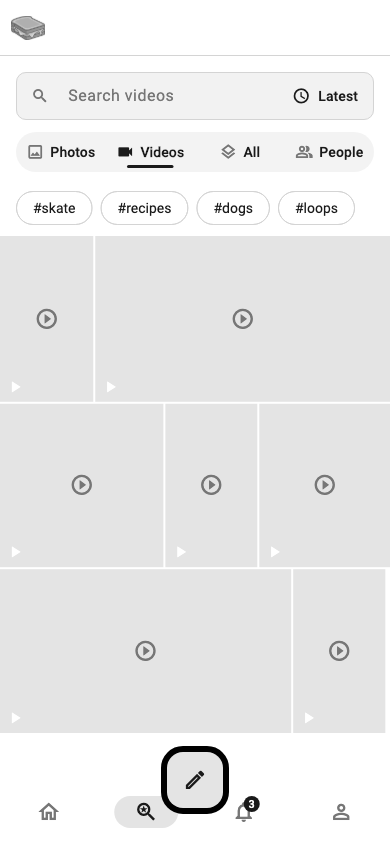
Explore is how you find things that are not already in your feed. The search box sits at the top, and a row of four filters under it decides what you see and what the box searches. Photos is where Explore opens.
- Photos
-
Trending hashtags among photo posts, as a row of tags you can scroll sideways, then a grid of the photos that are trending right now. Tap a tag to search it, or tap a photo to open the post.
- Videos
-
The same, for videos: trending video hashtags, then a grid of trending videos.
- All
-
Every kind of post. With nothing typed, this shows trending topics and trending hashtags.
- People
-
Accounts, by username, handle, or display name, including accounts on other networks. With nothing typed, this shows accounts worth following. This is the filter to use when you know roughly who you are looking for.
Type something and the filter you have chosen narrows the results: Photos finds only photo posts, Videos only video posts, All finds every post, and People finds accounts. Switching filters runs the same search again. Clear the box to get back to what is trending, or under People, to accounts worth following.
What is trending is worked out separately for photos, videos and everything together, so a hashtag busy with text posts does not show up under Photos. On a quiet server Explore says nothing is trending yet rather than inventing something.
Live search
Search for a word, turn on Live, and new posts that match keep arriving on their own until you tap Stop. It works across the whole network, it is open to every account, and it has no time limit. New posts show up within a few seconds of being posted, after a short pause that gives content labels time to arrive first.
Scanning a code
Under People, the button at the right of the search box opens the code scanner. Point it at another phone showing a Grilled Cheese identity code and you land on that profile. It is the fastest way to follow somebody standing in front of you.
Starter packs and curated lists
Explore also surfaces starter packs: hand-assembled groups of accounts on a theme, which you can follow individually or all at once. They are how a new account gets a feed worth reading before it has found anyone.
Curated lists work the same way but stay useful after onboarding: a list has members, a description, and a preview of who is in it, and following the list follows what it collects.
Hashtags
Tapping a hashtag anywhere in the app opens its own timeline. From there you can follow the hashtag, and its posts start appearing in your feed the way an account’s would.
Notifications

The Alerts tab collects everything other people did that involves you: follows, likes, replies, reposts, quotes, and mentions. Each row names the account, says what they did, and carries a small icon so the kind is readable at a glance. Unread rows are marked with a dot and sit on a tinted background.
Tapping a row goes to the thing itself: the post that was liked, the thread that was replied to, the profile that followed you. The badge on the bell in the bottom bar counts what you have not read; opening the tab clears it.
Notifications are per identity. Switching identities switches the inbox, so alerts for a persona you are not currently using do not interrupt the one you are.
Choosing what notifies you
Settings → Notifications turns each kind on or off independently: mentions, replies, reactions, follows, direct messages, and channel posts. The preference belongs to the identity, so a work persona can notify on mentions only while a personal one notifies on everything.
Turning a kind off means the alert is never recorded at all, not merely that it stays quiet. Nothing collects in the background waiting for you to turn it back on, and turning it on again does not backfill what you missed. That is worth knowing before switching one off: it is a decision about what you want to know, not about when you want to be told.
Follow requests
If your identity is private, follows arrive as requests rather than notifications you can only read after the fact. They collect in their own screen, reachable from your profile, where each one can be approved or denied.
Settings

Settings is split by what a change applies to, and the screen says which is which so you never have to guess whether you are changing one persona or all of them.
- Your account
-
One human. Shared by every identity you have.
- This identity
-
The persona you are currently posting as. Switching identity switches the whole section.
- This device
-
How this particular install looks and behaves. Deliberately not synced, so a phone and a laptop can differ.
Every screen below is reachable from that root.
Your account

Account gathers everything that belongs to you rather than to a persona.
- Account status
-
The state of the account itself, as a read-only value: Active, Anonymous, Disabled, Suspended, or Banned. It answers whether the account can be used, and says nothing about moderation.
- Email address
-
The address the account is registered with, and where you change it. Changing it sends a code to the new address.
- Phone number
-
Add or change a phone number. A verified phone can sign you in and recover the account.
- Change password
-
Set or replace the account password.
- Two-factor authentication
-
Turn on a second factor using an authenticator app. Enrolling walks you through scanning a code and confirming it, then gives you recovery codes, which are the way back in if you lose the authenticator. Save them somewhere that is not your phone. Once it is on, you can also see remembered devices, the ones allowed to skip the second factor, and forget any of them.
- Sessions
-
Everywhere the account is signed in, with the device and the last time it was used. End any you do not recognise.
- Your reports
-
What you have reported and what came of it.
- Moderation record
-
Your current standing, any live strikes, and every enforcement action taken, each with the guideline it cited and its appeal. The record covers all identities on the account, not just the one you are posting as.
- Delete account
-
Removes the account and every identity on it. The screen explains what cannot be undone before it proceeds.
Developer
Developer holds API keys, which let other tools reach your account, including Grilled Cheese’s MCP server.
A key can be read-only, or it can also write, so a connected tool can post and follow as you. Both are open to every account. There is a ceiling on how many keys you can hold at once: revoke one to create another.
A key is shown once, when it is created, and never again. Copy it then.
On the web the same screen is called Integrations. The web’s account settings also have Connected apps, which lists the apps and AI tools you have let in through a consent screen rather than a key, and lets you disconnect any of them.
For what the keys unlock, scope by scope, and how to connect Claude and other AI tools, see Connecting AI tools.
This identity
The identity these apply to is named at the top of the section, with a Switch button so you can change which one you are configuring without leaving the screen.
Scheduled posts
Posts waiting to publish. Edit the time, publish one now, or delete it before it goes. You can hold up to 5 scheduled posts.
Notifications

What notifies this identity: follows, likes, replies, reposts, quotes and mentions, each independently. Because the preference belongs to the identity, a work persona can notify on mentions only while a personal one notifies on everything.
Privacy

Who can see this identity and how people reach it.
- Account privacy
-
Whether the identity is private. On a private identity, follows arrive as requests you approve, and posts are hidden from anyone who is not an approved follower. Switching it asks you to confirm, because the two networks Grilled Cheese federates with do not treat a locked account the same way — see Private accounts and the other networks.
- Blocked and muted accounts
-
The two lists, and the way off them. Muting is one-way and silent; blocking is mutual.
- Location
-
Whether Grilled Cheese may use your location at all, how precise the place attached to a post is, and whether to delay it so a post reads "I was here" rather than "I am here". Also where the photo map is turned off.
- Keep location data on photos
-
Off unless you turn it on. Off, the place a photo was taken is removed from it on your device before it uploads. Camera and lens details are kept either way. See What happens to a photo when it uploads.
- Secure Conversations
-
The switch for end-to-end encrypted conversations, which are a beta, and the choice of which message buttons your profile shows. Read the screen before turning it on: a secure conversation stays on the device that started it. See Secure Conversations.
Private accounts and the other networks
Making an identity private is straightforward inside Grilled Cheese: only followers you approve see your posts, and new follows wait for you. Across the two networks Grilled Cheese federates with it is worth knowing exactly what you get, because they are not the same. For everything else that differs between them, see Federation.
Nothing is published while your account is private. When you lock the account your existing posts there are removed, and your profile is replaced with your name, your picture, and a note saying the account is private with a pointer back to Grilled Cheese. Anyone who finds your handle on Bluesky can see that you exist and that you are private — nothing more.
New posts are still delivered, but only to the followers you approved, and they carry a marker asking other servers to keep them off public timelines and to refuse boosts. Your profile advertises that you approve followers manually, so someone following you from Mastodon sees "requested" until you say yes. Their request arrives in the same follow-requests inbox as a local one.
|
Important
|
This is delivery control, not a lock on the content. Other servers are asked to respect it; nothing forces them to. Once one of your posts reaches somebody else’s server, we cannot take it back or control what happens to it there — the people running that server can read it, and anybody who can see a post can screenshot it. Treat a private post as private from the public, not as a secret. |
-
Locking does not un-send anything. Posts you made while the account was public stayed public, and copies may already exist elsewhere.
-
Followers you already have keep their access. Only new follows need approving.
-
If you unlock the account later, posts are not retroactively republished to Bluesky. Only what you post from then on is.
Content label
Under Settings → This identity → Content label you can mark your whole profile as Adult, Sexual, Nudity or Graphic. Every new post you make carries at least that label, and the label travels with your posts to Bluesky and the fediverse. Adult, sexual and nudity posts are shown only to signed-in adults who turn on Mature content in their settings on the web; graphic posts are covered with a warning. You always see your own posts. If you label your profile while your own Mature content setting is off, the app tells you and links to it.
Content preferences

What this identity sees.
-
Sensitive content: how much of it reaches you from people you do not follow, set to Less, Standard, or More. Sensitive posts from profiles you follow are shown like any other post. See Content warnings.
-
Political content: whether Grilled Cheese suggests it to you or holds back.
-
Hidden words: posts and replies containing them are not shown to this identity. Matching is case-insensitive, and there is a cap on how many you can hold. Unlike a content warning, a hidden word is invisible to everyone but you.
-
Muted accounts, and whether like and share counts are hidden on other people’s posts.
Community Notes
Whether this identity sees reader-added context on posts, and whether you want to contribute it. Contributing has its own opt-in, because writing notes is a different commitment from reading them.
Sharing across networks
How far this identity reaches into the wider social web. ActivityPub and ATProto are separate switches, so an identity can federate to one, both, or neither. Both are on by default.
Turning one off stops new posts and reposts being sent to that network. It cannot recall what has already been delivered to other servers, and the screen says so. Deleting a post still withdraws it either way, because a retraction is the thing you would most want to work. See Turning a network off.
Language
The language Grilled Cheese itself is in: its buttons, its labels, and the rest of the interface. It belongs to the identity, so each one keeps its own, and switching identity switches the interface with it without a restart. Left on System default, an identity follows your device’s language.
This is separate from the language you declare a post is written in, which is set per post in the composer.
Languages still being checked over are marked beta and ask you to confirm before switching, because a half-translated interface is harder to leave than to enter.
This device
These are not synced. Signed in on a phone and a laptop, each keeps its own.
Appearance

Light or dark, and which theme. Grilled Cheese ships with nine built-in theme families, each with a light and a dark variant.
Lock vertical layout keeps the single-column layout at any width and stops a phone rotating. See The app frame for what it is for.
Show the text feed, off by default, adds Text to the feed switch on Home. Text posts still appear in Everything when it is off.
Accessibility

Text size, higher contrast, and reduced motion. Text size is a multiplier over the system setting rather than a replacement for it, so it stacks with whatever your device is already doing.
Alt text reminder, on by default, is what puts the nudge under a photo you have not described yet. See Alt text for what it asks for and why.
Storage

How much space cached photos and video are using, and a way to clear it. Clearing costs nothing but a re-download.
This is also where saving to your camera roll is turned on or off, including whether a markup image is saved when you post it.
More
More holds the smaller device preferences, including whether videos autoplay always, on Wi-Fi only, or never, and whether links open inside Grilled Cheese or in your browser.
About and feedback
- About
-
Version, licences, and the links to these documents.
- Send feedback
-
Write to us from inside the app. It carries the app version and device with it, so you do not have to.
Conversations and moderation
These parts of the app are described here but not yet illustrated; their wireframes need fake-server support the generator does not have yet.
Conversations
Conversations in the menu holds private messages, one-to-one or in a group. Group membership is managed from the conversation’s info screen, where you can add people, see who is in it, and leave.
There are two kinds, and they sit in the same list.
- Conversations
-
The default, and the kind the Message button on a profile starts. A conversation is private, and it travels between your device and Grilled Cheese over an encrypted connection. It belongs to your account, so it is there on every device you sign in to, and a new phone picks it up where the old one left off. It is not end-to-end encrypted, which is what lets it follow you: Grilled Cheese’s servers store it and can read it.
- Secure Conversations
-
End-to-end encrypted: Grilled Cheese’s servers carry the messages but cannot read them. They carry a lock in the list. They are a beta, and they are off until you turn them on.
A conversation with someone on another network, such as Mastodon, is always an ordinary one, and the server on their side can read it too.
Secure Conversations
Secure Conversations use the Messaging Layer Security standard (RFC 9420). The keys that unlock a conversation are made on your device and never leave it, so only the people in the conversation can read what is said.
Because the encryption is real, a few things follow that do not apply to an ordinary conversation. The settings screen says them before you opt in:
-
A secure conversation belongs to the device you started it on. It does not follow your account, it is not backed up, and a new phone cannot open the ones you already had. You start new ones instead.
-
Signing in on a second device can stop new secure conversations reaching the first.
-
A message sent to you before your device had its keys cannot be decrypted after the fact. The app tells you that rather than showing an empty bubble.
-
Messages in a secure conversation are removed after 30 days, from your device and from our servers.
-
Open Settings → Privacy → Secure Conversations.
-
Read the screen, then turn the switch on.
-
Choose which message buttons your profile shows, under Message buttons on your profile:
-
Ordinary button only: your profile looks like everyone else’s. You can still start secure conversations with people who offer them.
-
Both buttons: people choose. Anyone who has not turned Secure Conversations on can still message you the ordinary way.
-
Secure button only: the ordinary button goes away. This makes you harder to reach, because anyone who has not turned Secure Conversations on has to do so before they can message you at all.
-
Open the profile of the person you want to write to. If they offer Secure Conversations, their profile shows a lock button next to, or in place of, the Message button. Tap it to start a secure conversation. It opens like any other conversation, and it carries a lock in your list so you can tell it apart.
Both of you need Secure Conversations turned on. If someone offers it and you have not turned it on yet, the lock button is drawn greyed out. Tapping it explains the beta and takes you to the setting. If a profile shows no lock button, that person does not offer Secure Conversations, and an ordinary conversation is the way to reach them.
Turning Secure Conversations on does not change your ordinary conversations. They stay with your account, on every device.
To delete a one-to-one conversation, choose Delete conversation from its menu. It is permanent, and it goes from every device you sign in from. If either of you writes again the conversation comes back empty. The other person keeps their copy until they delete it too. A group conversation is left rather than deleted.
Conversations belong to the identity you are using, like everything else.
Reporting and moderation
Every post and every account has Report in its overflow menu. A report asks what is wrong and lets you add context.
Settings → My reports shows what you have sent and what came of it. Reports go somewhere and you can see where. Settings → Moderation record is the other direction: your own standing, and every action taken against the account, with an explanation rather than a silent penalty. One record covers all identities on the account.
Between muting, blocking, hidden words, and content labels there is a lot of ground between "see everything" and "report it". See Content preferences for the controls, and Content warnings for what the labels mean and how to report a post that should have carried one.
Getting help
If something here is wrong, out of date, or missing, say so, at [email protected]. You can also send feedback from inside the app: open the menu and choose Send feedback.